3 steps, about 2 minutes. Then just ask Claude for jobs posted today, with links to apply before everyone else.
- 1
Copy the ApplyBolt link
- 2Open Claude →
Add it to Claude
Sign in if it asks. Then fill in the box that pops up:
NameApplyBoltURLPaste the linkTap Continue, then Add. Done ✅
- 3
Ask Claude for new jobs
Start a new chat and paste one of these. Change the role or city to yours:
The first time, Claude asks to use ApplyBolt. Tap Allow.
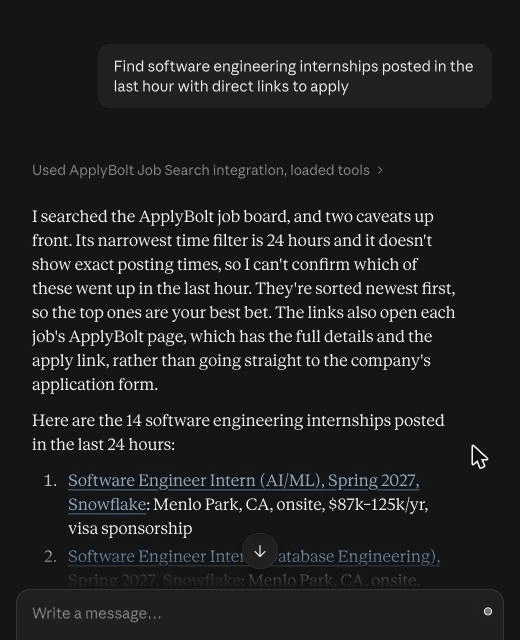
What you'll get
Not working?
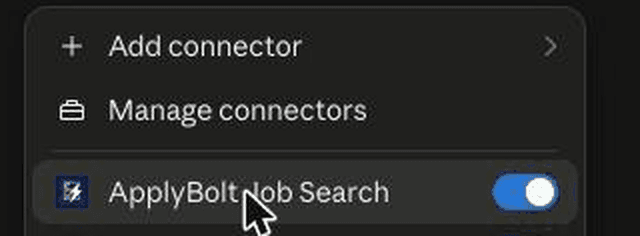
- Claude isn't using ApplyBolt? In a chat, tap + → Connectors and switch on ApplyBolt Job Search.
- Connector won't add? Check the URL is exactly
https://applybolt.app/mcp. - No “Add custom connector” box? Open claude.ai in Safari or Chrome, then go to Customize → Connectors → Add → Add custom connector.
Tips to apply first
- The newest jobs come first, so the top of the list is the freshest.
- The tightest time filter is the last 24 hours. Check a few times a day.
- Be specific: role, internship or new grad, city or remote, visa sponsorship.
- Each link opens the job's ApplyBolt page with the full details and apply link.
Want ApplyBolt to tailor your resume and apply for you too? See how it works.